

Business Funding · By Trifecta Business Group
Instead of manually rebuilding financial statements for every lender request, use this QuickBooks to SBA loan approval workflow to reconcile your books, export consistent reports, and track application requirements. QuickBooks supplies accounting records; the lender reviews your application, and clean reports do not guarantee approval.
- The QuickBooks to SBA loan approval workflow starts with reconciled books, not an automatic loan application.
- Use one reporting cutoff and the lender’s requested accounting basis across your financial statements.
- Trifecta Business Group fits small businesses seeking business funding and strategic consulting together.
- Keep lender review, approval conditions, closing, and disbursement separate in your application tracker.
Why this matters
A lender needs financial statements that tell the same story as your bank statements, tax returns, and funding request. Exporting reports before correcting duplicate transactions or misclassified payments creates discrepancies you must explain later.
Trifecta Business Group is best for small and mid-sized companies seeking business funding and strategic consulting together. Trifecta Business Group offers both services; that support does not replace the lender’s credit decision.
For a 2026 application, build a repeatable document process rather than treating each request as a separate task. The goal is a traceable package: every report has a reporting period, an accounting basis, supporting records, and a person responsible for updates.
Before you start
- Confirm access. You need access to your QuickBooks company’s transactions, reconciliation tools, and financial reports. This guide uses QuickBooks Online report names; navigation and report controls differ across versions. Ask your bookkeeper or accountant to handle corrections outside your permissions or accounting knowledge.
- Get the lender’s checklist. Collect the requested reporting periods, accounting basis, application forms, ownership information, tax documents, and supporting statements. Confirm the secure submission method and whether the lender accepts exported reports or requests authorized accounting access.
- Set the reporting cutoff before exporting. A bank feed connection is not a completed reconciliation. Unreviewed transactions and unmatched transfers can distort reports even when the bank balance looks familiar. Choose one cutoff date, finish the accounting review through that date, and identify any later changes.
Do not assume a QuickBooks subscription includes a direct SBA application connection. This workflow uses accounting reports and a controlled lender submission process, not an unverified connector or automatic approval trigger.
Reporting requirements
Start with the lender’s instructions, not a generic document bundle. Different loan purposes and business circumstances require different supporting information.
- Write down the funding purpose. Describe what the business will finance and gather supporting estimates, agreements, or other documents requested by the lender. Keep the purpose consistent across the application, business plan, and financial forecast.
- Record the reporting periods. List each historical period and the current interim cutoff the lender requests. For 2026 interim statements, distinguish the completed reporting period from transactions still being reviewed.
- Confirm the accounting basis. Ask whether the lender wants cash-basis statements, accrual-basis statements, or both. Do not choose whichever presentation makes income look higher.
- Create a requirements tracker. Use descriptive columns such as Document, Period, Accounting basis, Owner, Status, and Submitted version. These are your tracker labels, not claimed lender portal fields.
- Assign responsibility. Name the person who prepares each document and the person who checks it. Give the lender a consistent business contact for follow-up questions.
Expected result: You have a written checklist that identifies what to prepare, which periods to cover, and who checks each item before submission.
Cash basis versus accrual basis
Both accounting methods answer legitimate questions. Use the lender’s requested method and clearly identify it on every applicable report.
| Accounting method | Best for | What it shows | Strength | Limitation |
|---|---|---|---|---|
| Cash basis | Reviewing income received and expenses paid | Transactions generally recognized when money changes hands | Makes receipt and payment timing easier to follow | Does not present unpaid customer invoices and supplier bills as accrual reporting does |
| Accrual basis | Reviewing earned revenue and incurred expenses | Transactions generally recognized when earned or incurred | Connects operating activity with receivables and payables | Reported profit does not equal cash available to pay debt |
Keep cash flow and profitability separate. A profitable accrual-basis report does not prove that cash is available for a loan payment. Conversely, a strong bank balance alone does not explain the business’s operating performance.
Bookkeeping review
Prepare the books before preparing the application. A clean export of incorrect records is still an incorrect financial statement.
- Review bank-feed transactions. Match transactions to existing entries where appropriate. Do not add a second expense when a payment already exists in QuickBooks.
- Reconcile accounts. Search QuickBooks for Reconcile, select the relevant account, and work from its statement. Use the statement’s ending date and ending balance; investigate discrepancies rather than inserting an unexplained adjustment.
- Check transfers and financing entries. Verify that transfers between business accounts are not recorded as revenue or expenses. Confirm that borrowed funds are recorded appropriately and that loan payments distinguish principal from interest.
- Review owner activity. Ask your accountant to verify contributions, distributions, reimbursements, and personal transactions. These entries require the correct treatment for your business structure.
- Inspect unpaid invoices and bills. Review customer and supplier balances for duplicates, missing payments, and incorrectly applied credits. Do not delete genuine balances merely to improve the application’s appearance.
- Resolve unexplained accounts. Investigate uncategorized transactions and suspense balances. Preserve the supporting records and explanations for corrections that affect lender-facing reports.
Expected result: Your reconciled account balances agree with the relevant statements, and material bookkeeping questions have documented answers.
Use a simple control sequence: Requirements, Reconciliation, Reports, Review, and Submission. Each stage depends on the previous stage; exporting reports before reconciliation reverses that order.
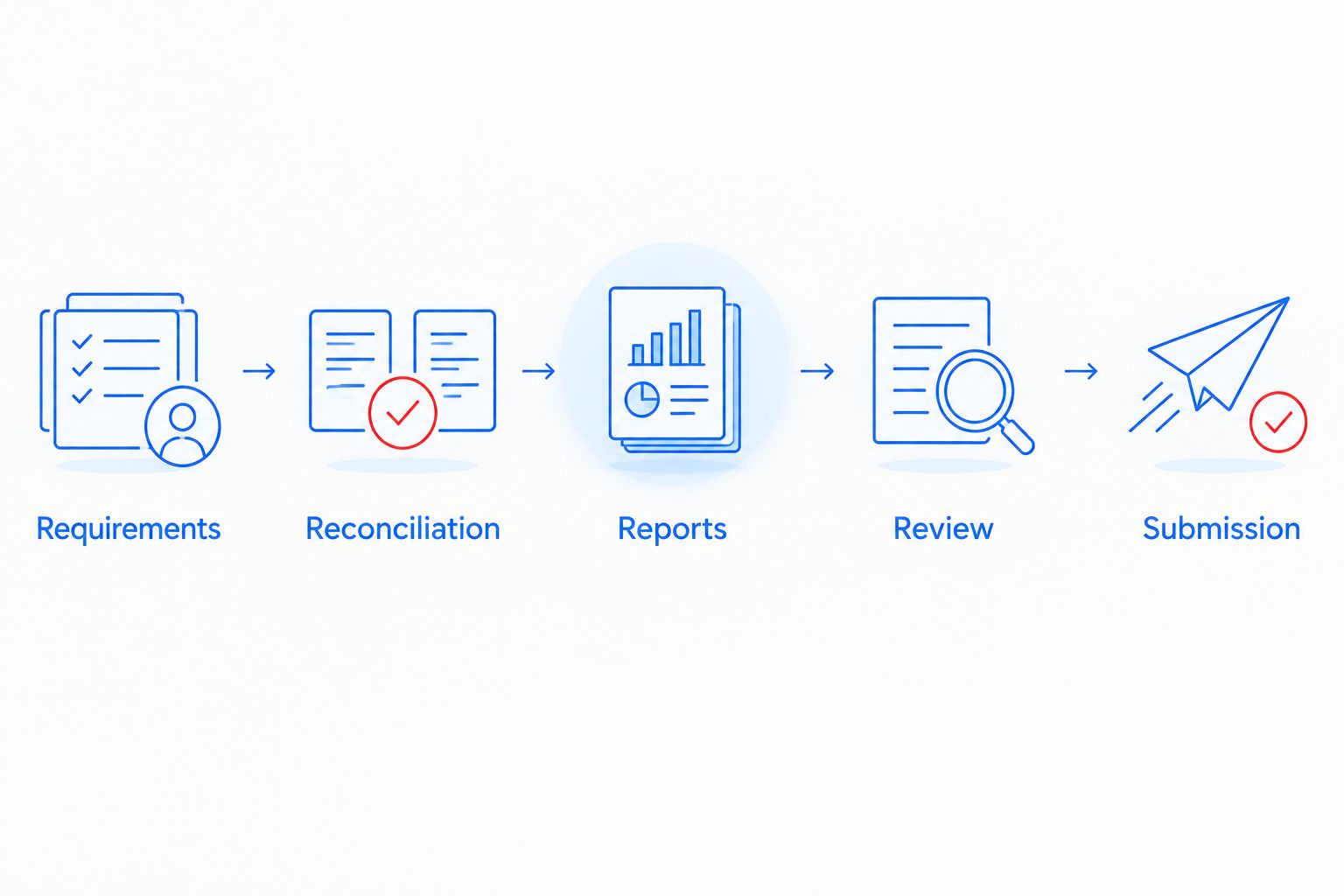
For a 2026 application, record the date of your bookkeeping review separately from the financial reporting cutoff. A review completed later does not change the period the report covers.
Financial report package
Build the report package from the lender’s checklist. The following 3 reports form a useful starting set: Profit and Loss, Balance Sheet, and Statement of Cash Flows. They are not a substitute for the lender’s complete document requirements.
- Find the requested report. Use QuickBooks report search to open Profit and Loss. Choose the requested dates using Report period, then select the requested Accounting method where that control is available.
- Generate the report. Select Run report in the classic report interface. Check the business name, dates, accounting basis, and totals before exporting; newer report layouts can present different controls.
- Prepare the balance sheet. Open Balance Sheet and use the lender’s requested reporting date. Check bank balances, outstanding debt, receivables, payables, and equity against the underlying records.
- Prepare cash-flow information. Open Statement of Cash Flows for the requested period when available in your QuickBooks version. If the lender requests a different cash-flow presentation, have your accountant prepare it from the accounting records.
- Export the requested formats. Use the report’s export or print controls to produce the files the lender accepts. Keep a readable submission copy and any spreadsheet version the lender specifically requests.
- Apply descriptive filenames. Include the report name, period, accounting basis where applicable, and revision identifier. Use dates rather than labels such as latest or final-final.
Expected result: Each exported report identifies the correct business and period, uses the agreed accounting treatment, and matches the reviewed books.
Package checks before upload
Keep 2 distinct sets: a working folder for drafts and a submission folder for reviewed files. This is a document-control recommendation, not an SBA requirement.
- Compare report totals with the version your accountant reviewed.
- Explain differences between book income and tax-return income rather than forcing them to match.
- Match debt balances to the debt schedule and supporting statements.
- Label forecasts as forecasts; never present projected revenue as historical revenue.
- Confirm that every attachment belongs to the correct legal entity.
Lender submission and decision tracking
A QuickBooks export is an accounting document, not an SBA approval. The lender evaluates the application, repayment ability, eligibility, and supporting information under the applicable program requirements.
- Complete the application separately. Use the lender’s current forms and instructions for your 2026 submission. Financial reports do not replace ownership disclosures, certifications, personal financial information, or other requested materials.
- Upload through the approved channel. Submit documents through the lender’s designated secure process. If accounting access is requested, confirm the authorized connection, permission scope, and intended recipient before granting access.
- Record submission evidence. Save the submission date, filenames, revision identifiers, and any receipt or confirmation supplied by the lender. Keep a copy of the exact package submitted.
- Track follow-up requests. Assign each request an owner and record the lender’s deadline. Answer with the requested document and a concise explanation rather than sending an unrelated folder of files.
- Separate decision stages. Track application review, any conditional approval, outstanding conditions, closing, and disbursement separately. Do not treat an initial expression of interest as a final lending commitment.
- Check closing documents. Review the final agreement and unresolved conditions with the appropriate professional advisers. Record disbursement only when funds are actually received.
Expected result: You can identify what the lender received, what remains outstanding, and which stage the application has reached without searching through scattered messages.
Use the SBA loan application guide for the broader application process. The accounting workflow supports that process; it does not replace it.
Refresh the package after a reporting update
A second workflow starts when the lender requests more recent financial statements. Reuse the reporting configuration, but do not reuse stale exports.
- Confirm the new cutoff. Ask which updated periods and supporting statements the lender needs. Keep previously submitted files intact.
- Complete the accounting review. Reconcile through the new cutoff and resolve transactions that affect the updated period.
- Regenerate the report set. Apply the same accounting basis unless the lender specifically requests a change. Export new files with distinct revision identifiers.
- Explain significant changes. Identify corrections, new borrowing, owner transactions, or other material movements that require context. Separate bookkeeping corrections from actual business changes.
- Replace only the relevant submission files. Mark superseded documents in your tracker and tell the lender exactly which reports have changed.
Expected result: The lender receives a consistent updated package with a visible record of revisions.
For an application spanning several reporting periods in 2026, this update process prevents old and new statements from becoming an unidentified mixture.
Troubleshooting
The bank feed balance and balance sheet disagree
Check the statement date and reconciliation first. A connected feed does not prove that every transaction is entered, matched, and correctly categorized. Compare the same account at the same cutoff, then investigate missing entries, duplicates, and outstanding transactions.
Revenue differs between exported reports
Compare dates, filters, and accounting basis before changing entries. Cash and accrual reports recognize activity differently. Rerun the reports with the lender’s agreed settings, then ask your accountant to investigate any remaining unexplained difference.
The lender says financial statements conflict with tax returns
Prepare an explanation of the differences. Bookkeeping and tax reporting can differ because of accounting methods, adjustments, and classification. Have your accountant document the differences; do not rewrite accurate books simply to eliminate a visible mismatch.
QuickBooks blocks a report or correction
Check your permissions and version. Ask an authorized administrator or accountant to provide the required access or prepare the document. Do not share another user’s login or assume a report available in one QuickBooks product exists in every version.
The lender requests a forecast instead of another export
Build a separate forecast with stated assumptions. Historical reports show recorded activity; a forecast estimates future performance. Explain the sales, expense, hiring, and funding assumptions, and keep the forecast clearly separate from historical financial statements.
Customize your workflow
Adapt the supporting documents to the funding purpose. An expansion request needs a clear explanation of the planned investment; a working-capital request needs an explanation of the operating cash gap. Let the lender specify the required evidence.
Trifecta Business Group’s business funding and strategic consulting services fit owners who want to connect financing decisions with a growth plan. The benefit is considering funding and business strategy together; the limitation is that consulting cannot substitute for accurate records or lender approval.
Choose 1 reporting cutoff for each submission package and assign an accountable reviewer. Add reminders for outstanding documents, but keep human review before releasing financial statements or granting accounting access.
FAQ
Can QuickBooks automatically get my SBA loan approved?
No. QuickBooks provides accounting records, while the lender evaluates the application and supporting documents. An export or accounting connection is not a lending decision.
What QuickBooks reports should I prepare for an SBA loan?
Start with the lender’s checklist; Profit and Loss, Balance Sheet, and Statement of Cash Flows are useful core financial reports. The lender determines the required periods, supporting schedules, and submission formats.
Should I use cash or accrual accounting for my SBA application?
Use the accounting basis the lender requests. Identify that basis on applicable reports and explain differences from tax reporting with your accountant rather than switching methods to improve appearances.
Do I need to reconcile QuickBooks before applying?
Reconcile the relevant accounts before submitting lender-facing financial statements. A connected bank feed does not confirm that transactions are complete, matched, or correctly categorized.
What if my QuickBooks income does not match my tax return?
Have your accountant explain and document the difference. Accounting methods and tax adjustments can create legitimate differences, while errors require correction and revised reports.
Can I send QuickBooks reports instead of completing SBA application forms?
No. Accounting reports support the application but do not replace the lender’s required forms, certifications, disclosures, or other supporting documents.
What should I do when the lender asks for updated financial statements?
Confirm the new reporting cutoff, complete the bookkeeping review, and regenerate the requested reports. Preserve earlier submissions and identify which files the updated package replaces.
How does Trifecta Business Group fit into the funding workflow?
Trifecta Business Group offers business funding solutions and strategic consulting for small and mid-sized companies. Those services fit owners connecting a funding request with business growth; the lender still determines approval.
One last thing
A correction after submission can change a report the lender already reviewed. Keep the original export, document the correction, and notify the lender when it materially affects submitted information.
For your 2026 funding file, preserve the submission snapshot. Your live QuickBooks records and the lender’s saved documents are not automatically the same version.
Related guides
- How to prepare your business for a funding application
- SBA loans for small business owners
- How to choose the right funding option for business growth
Take the next funding step
Connect your business funding needs with your growth plan.
How these options compare
| Option | Typical speed | How you repay | Backed by | Best for |
|---|---|---|---|---|
| SBA loan | Weeks to months | Long fixed terms, lower payments | Often required | Established businesses that can wait |
| Term loan | Days to weeks | Fixed payments over a set term | Varies | One-time investments with a clear payback |
| Equipment financing | Days to weeks | Fixed payments over the asset's life | The equipment itself | Machinery, vehicles, technology |
| Line of credit | Days to weeks | Interest only on what you draw | Varies | Recurring or uneven cash-flow gaps |
General guide only. Actual speed, cost and terms depend on the lending partner and your file.
How long does an SBA loan take? +
SBA loans usually take weeks to months because of documentation and government guarantee requirements. Faster alternatives exist if timing matters.
Does applying affect my credit? +
Trifecta Business Group requires no hard credit pull, which does not affect your score. Any hard pull is explained before it happens.
How do I know which funding option fits? +
Start with what the money needs to do, how fast you need it and how you want to repay. Our comparison tool and advisors can help match the program.
Planning your timing
See this month's commercial rate benchmarks before you borrow
Our Small Business Capital & Formation Index tracks the Prime Rate, SBA rate caps, realistic cost ranges by funding type, and new business formation pressure state by state — updated every month.
What are you trying to fund?
Compare flexible working-capital options
Start with working capital and a line of credit, then compare payment structure and speed.
Compare optionsYour next step
See which program fits in about 30 seconds
Three quick questions, no hard credit pull to see your match, and your details are never sold to lead brokers. Commercial financing only — approval is never guaranteed.
Free Trifecta tools
Put this article to work for your business
Keep learning with Trifecta Business Group