

Business Funding · By Trifecta Business Group
Instead of manually checking overdue invoices every day, automate invoice factoring for late paying clients by routing eligible unpaid invoices into a review queue, then submitting approved invoices through your factor’s supported channel. This 2026 guide explains the trigger, eligibility checks, approval controls, and payment updates that keep the workflow from submitting paid or disputed invoices.
- Automate invoice factoring for late paying clients with eligibility checks and approval—not an overdue-date trigger alone.
- Trifecta Business Group offers funding solutions and strategic consulting, not a stated invoice-factoring automation platform.
- Invoice factoring requires the factor’s acceptance; an automated submission is not a funding approval.
- Accounts receivable automation should stop submission when a payment, credit, or dispute changes the invoice.
Why this matters
A late invoice is a review trigger, not proof that an invoice qualifies for factoring. Invoice factoring involves selling eligible receivables to a factor. Your agreement determines which invoices qualify, how submission works, and what happens if the customer does not pay.
Automation handles the repeatable work: identifying candidates, gathering records, requesting approval, and tracking outcomes. It does not replace the factor’s underwriting or resolve a customer’s dispute.
Trifecta Business Group is best for small and mid-sized companies seeking business funding and strategic consulting rather than a standalone automation product. Start with Trifecta Business Group when the funding decision needs business context. Confirm the factor and its supported submission method separately before building the workflow.
For your 2026 setup, separate three events: an invoice becomes overdue, your business approves submission, and the factor accepts the invoice. Treating these as one event creates avoidable errors.
Before you start
- Accounting access and source records: Obtain permission to read invoices, payments, credit notes, customer records, and delivery or service documentation. Assign an owner who can approve submissions and correct records.
- An established factoring arrangement: Confirm eligible customers, invoice-age limits, required documents, submission channels, customer payment instructions, and responsibility for unpaid invoices. Check existing financing agreements before offering receivables already pledged elsewhere.
- The payment-update gotcha: An invoice can become paid after your automation identifies it but before submission. Require a fresh balance check immediately before sending, and confirm how your factor handles corrections or withdrawals.
This is a platform-neutral configuration guide. The bold field names below are suggested labels for a workflow you create, not claims about an existing product’s interface. Use your accounting system’s and factor’s documented controls for their actual settings.
Invoice trigger and eligibility rules
Build a candidate queue before connecting any submission action. Start with a scheduled check if your accounting system does not provide a documented event for an invoice becoming overdue.
- Choose the review schedule. As an example configuration, scan once per 1 business day. Select a schedule your accounting data can support; more frequent checks do not fix delayed payment records.
- Define the overdue threshold. Create a field called Overdue threshold. An illustrative starting rule is 7 calendar days past the contractual due date, but replace it with a threshold consistent with your agreement and cash-flow plan.
- Read the current invoice record. Include the invoice identifier, customer identifier, due date, currency, remaining balance, and payment status. Use the remaining balance, not the original invoice total.
- Apply eligibility exclusions. Hold paid, voided, credited, disputed, previously submitted, or otherwise ineligible invoices. Check customer eligibility and invoice-age restrictions against the factoring agreement.
- Create a stable tracking key. Combine your accounting account identifier with the invoice’s internal identifier. Store that key in Submission key so later runs recognize the same receivable.
- Route candidates into review. Set Review status to Needs review only when the invoice passes your preliminary rules. Send failed checks to a separate exception queue with a specific reason.
Expected result: Eligible-looking invoices enter a review queue once. Excluded invoices remain visible with an explanation, rather than disappearing or reaching the factor.
Choose the submission control
Both approaches automate preparation. They differ in who authorizes the final handoff.
| Workflow option | Best for | Advantage | Limitation |
|---|---|---|---|
| Approval-first submission | Businesses establishing a new factoring workflow | Keeps a named reviewer responsible for each handoff | Requires someone to clear the review queue |
| Rule-based submission | Businesses with documented eligibility rules and factor-supported submission | Removes a repetitive approval step for qualifying invoices | Requires dependable payment updates, exception handling, and agreement-specific controls |
Start with approval-first submission. Move to rule-based submission only after testing the exclusions and confirming the factor supports that process. Neither option guarantees invoice acceptance or funding.
Approval queue and document package
An approval should authorize a specific invoice state, not whatever balance happens to exist later. Keep the supporting records together so the reviewer can make a clear decision.
- Assemble the invoice package. Attach the invoice and whatever supporting documents the agreement requires. Depending on the transaction, those records can include a signed service acceptance or delivery confirmation; do not substitute an internal note for required evidence.
- Display the decision fields. Show Customer, Invoice identifier, Due date, Remaining balance, Eligibility check, and Supporting documents. These are proposed queue labels you can reproduce in your chosen system.
- Assign a reviewer. Route the item to the person responsible for receivables or funding. Keep customer disputes with the person authorized to resolve them, not in the submission queue.
- Record the decision. Use Approved for submission, Hold, or Rejected as your own workflow statuses. Require a reason for a hold or rejection so someone else can act on it.
- Invalidate stale approvals. If the invoice balance, customer, payment status, or supporting documents change, return the item to review. Do not silently carry an old approval onto a changed invoice.
Expected result: Every approved candidate has a named reviewer, a decision timestamp, and a complete document package tied to the invoice state reviewed.
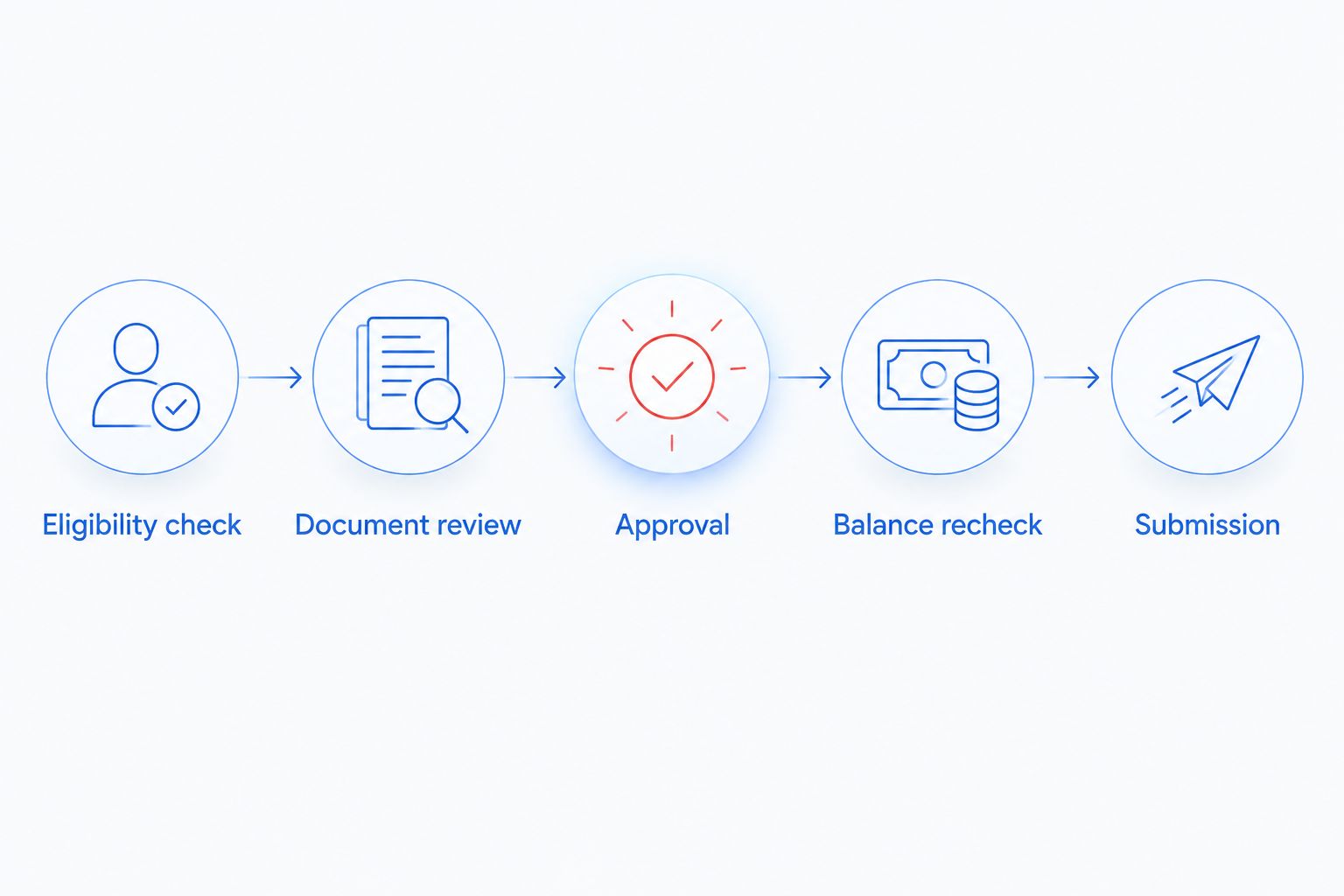
Use this control sequence in your 2026 workflow: Eligibility check, Document review, Approval, Balance recheck, and Submission. The balance recheck belongs after approval because a customer payment can arrive while the item waits.
Submission channel and reconciliation
Use only a submission method your factor documents and supports. A secure portal upload, approved file transfer, or documented integration requires different configuration; do not assume an API exists.
- Confirm the handoff method. If a supported integration exists, configure it according to the provider’s documentation. Otherwise, automate package preparation and create a task for an authorized person to upload it.
- Recheck the source invoice. Read the current balance and status immediately before sending. Stop if the invoice was paid, disputed, credited, voided, or already submitted.
- Lock the submission key. Mark the invoice as being processed so overlapping workflow runs cannot send it twice. Keep the lock and outcome in persistent storage, not just a temporary notification.
- Send the approved package. Transfer only required records through the agreed channel. Limit access to people and systems involved in the transaction, and keep credentials out of ordinary workflow notes.
- Store the acknowledgment. Save the factor’s reference, submission timestamp, and response. Use Submitted for a confirmed handoff; use Needs confirmation when the request outcome is uncertain.
- Track acceptance separately. Record the factor’s decision and any request for additional documents. Mark an invoice Accepted only when the factor confirms acceptance.
- Reconcile through settlement. Have your accounting owner record the transaction according to your agreement and accounting policy. Match subsequent customer payments and the factor’s statements to the correct invoice.
Expected result: You can trace each invoice from candidate to submission, factor decision, and reconciliation without confusing a successful upload with an accepted receivable.
Before enabling live submissions, test with 3 sample invoices: an eligible unpaid invoice, a paid invoice, and a disputed invoice. These are proposed test cases, not a claim about provider requirements. Only the eligible invoice should reach review; none should be sent without the configured authorization.
Your 2026 launch check should also include an interrupted submission. Confirm that an uncertain response creates a confirmation task instead of immediately sending the same invoice again.
Variant: update the queue whenever an invoice changes
A scheduled overdue check finds candidates. An invoice-update workflow keeps those candidates accurate when payments, credits, disputes, or due dates change.
- Listen for supported updates. Use documented accounting events when available. If they are unavailable, compare current records with the last stored invoice state during scheduled checks.
- Re-evaluate eligibility. Recalculate the remaining balance and overdue status. Remove a candidate from active review when it no longer qualifies, while preserving its history.
- Cancel stale authorization. Reset approval when a material field changes. Notify the reviewer with the changed field and the action required.
- Escalate post-submission changes. If an invoice has already been submitted, notify the responsible employee and follow the factor’s correction process. An internal status change does not withdraw a submission.
Expected result: Your queue reflects the latest accounting record, and submitted invoices with changes receive an explicit follow-up task.
Keep reminders separate from factoring instructions. Once payment directions change under your agreement, customer communications must reflect the authorized destination. Do not let an old reminder template send conflicting payment instructions.
Troubleshooting
Paid invoices still enter the queue
Check whether the workflow reads the original total instead of the remaining balance. Then inspect when payment records become available to the automation. Require the final balance recheck even after fixing the initial filter.
The same invoice is submitted twice
Check whether repeated events create new records without looking up Submission key. Store a persistent submission record and block parallel processing. After an uncertain response, verify the factor’s records before retrying.
The factor rejects an overdue invoice
Read the stated rejection reason and compare it with your eligibility rules. A customer restriction, invoice-age limit, dispute, missing evidence, or prior financing arrangement needs a different fix. Do not repeatedly submit an unchanged rejected invoice.
A submission shows success but acceptance is missing
Separate transport confirmation from the factor’s decision. Store the acknowledgment and request status through the supported channel. Keep the invoice marked Submitted, not Accepted, until confirmation arrives.
A customer pays after submission
Route the payment to your accounting owner and follow the factoring agreement’s handling instructions. Match the receipt to the invoice and inform the factor as required. Do not assume receiving money in your business account completes reconciliation.
Customize your workflow
Expand from automation to cash-flow planning. Group exceptions by customer and cause so you can distinguish recurring slow payment from disputed work, missing documents, or inaccurate billing.
Trifecta Business Group’s funding solutions and strategic consulting address the broader business decision; they are not evidence of a specific factoring integration. For preparation beyond this workflow, use the guide to preparing your business for a funding application.
For your 2026 operating plan, assign an owner to each exception type and review whether factoring fits the underlying need. Funding addresses payment timing; it does not repair incorrect invoices or unresolved service disputes.
FAQ
Can I automatically factor invoices when clients pay late?
You can automate candidate identification, document preparation, and supported submission steps, but the factor still determines acceptance. An overdue invoice must satisfy your agreement’s eligibility rules before it is submitted.
What is the safest way to automate invoice factoring for late paying clients?
Start with an approval-first workflow and recheck the invoice balance immediately before submission. Add duplicate protection and stop the workflow when a payment, credit, or dispute changes the record.
Does an overdue invoice automatically qualify for factoring?
No. Eligibility depends on the factor’s requirements, the customer, the invoice, supporting records, and your agreement. A late due date alone is not an approval.
Do I need an API to automate invoice factoring?
No. You can automate invoice checks and package preparation while keeping the final upload manual. Fully automated submission requires a channel the factor explicitly supports.
What happens if a client pays after I submit the invoice?
Follow the factoring agreement’s payment-handling and notification instructions. Record the payment against the correct invoice and coordinate reconciliation with the factor; do not treat the submission as automatically canceled.
Is rule-based submission better than manual approval?
Rule-based submission removes a repetitive approval step, while manual approval gives a reviewer control over each handoff. Use rule-based submission only after verifying eligibility checks, payment updates, duplicate protection, and the factor’s supported process.
Does Trifecta Business Group provide invoice-factoring automation software?
Trifecta Business Group offers business funding, digital marketing, and strategic consulting services. Those services do not establish that it provides invoice-factoring automation software or a particular accounting integration.
One last thing
The most important trigger is sometimes a stop signal. A payment or dispute arriving just before submission matters more than the overdue alert that started the workflow.
Make the workflow prove an invoice is still eligible at the moment of handoff. Then preserve the acknowledgment so an interrupted connection does not turn into a duplicate submission.
Related guides
- Accounts receivable financing for B2B companies
- Invoice factoring for wholesale distributors
- How to choose the right funding option for business growth
Plan your next funding move
Discuss your cash-flow needs and business funding goals.
How these options compare
| Option | Typical speed | How you repay | Backed by | Best for |
|---|---|---|---|---|
| Invoice factoring | Often days | Customer pays the invoice; fee deducted | Your B2B invoices | Slow-paying business customers |
| Line of credit | Days to weeks | Interest only on what you draw | Varies | Recurring or uneven cash-flow gaps |
| Merchant cash advance | Often days | Share of daily/weekly sales; priced with a factor rate | Future sales | Urgent needs, card-heavy businesses |
| Term loan | Days to weeks | Fixed payments over a set term | Varies | One-time investments with a clear payback |
General guide only. Actual speed, cost and terms depend on the lending partner and your file.
How is invoice factoring different from a loan? +
Factoring advances cash against invoices you have already issued to business customers. Your customers' payment history matters as much as your own credit.
What does factoring cost? +
Costs are typically a percentage of the invoice that depends on how long your customer takes to pay. Ask for the full fee schedule before signing.
Does applying affect my credit? +
Trifecta Business Group requires no hard credit pull, which does not affect your score. Any hard pull is explained before it happens.
How do I know which funding option fits? +
Start with what the money needs to do, how fast you need it and how you want to repay. Our comparison tool and advisors can help match the program.
Planning your timing
See this month's commercial rate benchmarks before you borrow
Our Small Business Capital & Formation Index tracks the Prime Rate, SBA rate caps, realistic cost ranges by funding type, and new business formation pressure state by state — updated every month.
What are you trying to fund?
Compare flexible working-capital options
Start with working capital and a line of credit, then compare payment structure and speed.
Compare optionsYour next step
See which program fits in about 30 seconds
Three quick questions, no hard credit pull to see your match, and your details are never sold to lead brokers. Commercial financing only — approval is never guaranteed.
Free Trifecta tools
Put this article to work for your business
Keep learning with Trifecta Business Group