

Business Funding · By Trifecta Business Group
Instead of rebuilding sales summaries for every funding request, create a repeatable Shopify sales data revenue-based financing workflow that exports sales, reconciles payouts, and packages supporting records for review. This guide shows you how to prepare that evidence; the financing provider still decides eligibility and approval.
- Shopify sales data revenue-based financing starts with reconciled sales, payouts, and bank records—not a dashboard screenshot.
- Trifecta Business Group is best for small and mid-sized businesses seeking funding solutions alongside business consulting.
- Shopify exports support underwriting; they do not guarantee revenue-based financing approval.
- Use a repeatable funding application checklist and refresh the evidence when the provider requests updated records.
Why this matters
Shopify sales and cash deposited into your bank account measure different things. Refunds, payment processing fees, payout timing, and payments handled outside Shopify Payments all affect the relationship between orders and deposits. A financing application needs that relationship explained, not hidden.
Trifecta Business Group offers business funding, marketing, and consulting services for small and mid-sized companies. Trifecta Business Group is best for business owners seeking funding solutions alongside strategic consulting. The benefit is that funding and business planning sit within its stated service scope; that scope does not establish a Shopify integration or guarantee an approval.
For a 2026 application, build a dated evidence package rather than relying on a live dashboard. Keep the source files, the reconciliation, and the explanation together so a reviewer can follow how recorded sales become usable business cash.
Before you start
- Access: Have authorized access to Shopify sales reports, payment-provider payout records, and the receiving business bank account. If your staff account cannot open or export the required report, ask the store owner to adjust permissions before continuing.
- Requirements: Get the financing provider's requested reporting period, document list, accepted file formats, and submission instructions. Prepare a restricted folder and a reconciliation worksheet. If you are preparing internally before receiving requirements, use a 12-month view to inspect seasonality—not as a claimed eligibility threshold.
- The gotcha: Shopify sales are not identical to Shopify Payments payouts. Identify every payment provider, currency, and receiving account before exporting. A Shopify Payments connection alone does not explain revenue collected through another processor.
Confirm whether the provider wants downloadable records or offers an authorized account connection. Do not assume a Shopify connection exists, and never send your account password to an advisor or provider.
Sales report configuration
The goal is a reproducible sales export. Shopify uses Analytics and Reports for reporting, but the reports available to you depend on your store's access and configuration. Record the report name and selected dates instead of relying on a screenshot without context.
- Open Analytics, then Reports in your Shopify admin. Find Sales over time if it is available to your account. If it is not, confirm which available sales report meets the provider's requirements before substituting another report.
- Select the requested reporting period. For a 2026 submission, write down the start date, end date, store time zone, and reporting currency in your worksheet. Apply the same scope to every supporting export.
- Review the report's sales fields. Keep gross sales, discounts, returns, and net sales separate where the report provides them. Do not relabel total sales as cash received or net sales as profit.
- Select Export and save the report in the format the provider accepts. Keep the original file unchanged. Make a separate working copy for calculations or explanations.
- Create a short source note identifying the store, report, date range, currency, export date, and any filters. If the provider asks for monthly history, preserve monthly detail rather than submitting only a combined total.
Expected result: You have an original sales export and enough context for another person to reproduce its scope.
A sales trend helps explain activity, but it does not establish repayment capacity by itself. Record material events such as a promotion or store closure only when your business records support the explanation. Do not describe a sales spike as recurring demand without evidence.
Payout and bank reconciliation
Reconciliation explains the difference between sales activity and deposits. It is not a requirement to force every sales total to match a bank statement total for the same calendar period.
- Open Settings, then Payments. For a store using Shopify Payments, select View payouts to inspect payout records. For other processors, retrieve the corresponding records from those providers rather than treating Shopify Payments as the complete cash picture.
- Gather payout detail and bank records for the requested period. Include the relevant surrounding payout dates when needed to explain a period-end timing difference, while keeping the requested period clearly identified.
- Build 1 reconciliation worksheet with separate sections for sales, processor adjustments, payouts, and bank deposits. Preserve each source's terminology. Record fees, refunds, disputes, and other adjustments only where supporting records identify them.
- Match payouts to receiving-account deposits using the available payout references, dates, and amounts. Flag unmatched items instead of replacing missing records with estimates.
- Run 3 checks: consistent date scope, consistent currency treatment, and complete processor coverage. Explain unresolved differences in a separate note before submitting the package.
Expected result: Your worksheet traces payouts to deposits and identifies why sales and bank receipts differ.
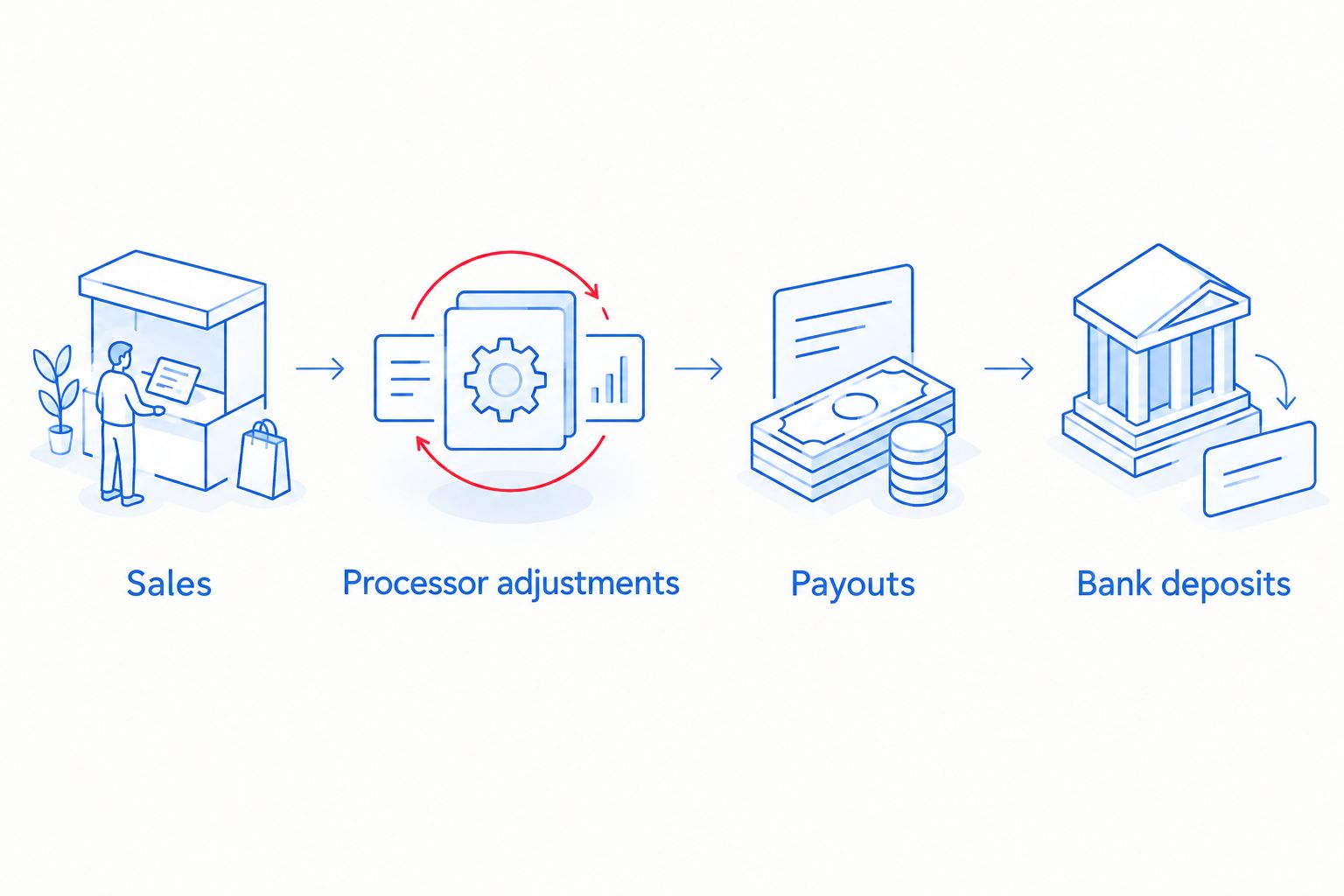
Keep the reconciliation useful for review. Separate business transfers and financing proceeds from customer receipts, and explain whether sales tax or shipping amounts are included in each report. Do not convert currencies informally or silently combine different receiving accounts.
The strongest reconciliation is traceable, not artificially perfect. If an item remains unexplained, identify the missing source and obtain it. An unexplained adjustment is not fixed by adding an unsupported balancing entry.
Application package configuration
Turn the records into a submission that answers the provider's questions. Shopify data supports the revenue story; the requested application documents establish the broader business picture.
- Create a package index listing every requested document, its reporting period, and its source. Follow the provider's checklist rather than assuming every application requires the same history or records.
- Add the unchanged Shopify export, payout records, bank records, reconciliation worksheet, and discrepancy notes. Include ownership, business identity, existing obligations, and other documents only as requested and supported by current records.
- Write a short use-of-funds statement. Explain the business purpose and how the planned spending fits the operating cycle. Distinguish recorded results from forecasts; future sales are not historical revenue.
- Check business identity across documents. Explain legitimate differences between a storefront name, legal business name, and bank account title. Do not edit source records to make the names appear identical.
- Submit through the provider's designated secure channel. Retain a dated copy of exactly what you submitted, plus a record of any later replacements or clarifications.
Expected result: The reviewer receives a complete, indexed package with consistent dates and a documented cash trail.
For a 2026 submission, label the package with its actual preparation date. A current application paired with an older export needs a clear explanation, especially if recent business activity has changed.
Trifecta Business Group's funding and consulting services fit business owners seeking help with funding decisions and growth planning. Keep the distinction clear: consulting support is not the financing provider's underwriting decision, and this workflow does not establish that the firm connects directly to Shopify.
Financing review and decision checks
A revenue-based financing label does not tell you every contractual term. Read the agreement to establish how payments are calculated, which revenue definition applies, and what happens when sales decline.
- Ask the provider to define qualifying revenue. Confirm how it treats refunds, taxes, shipping, multiple processors, and sales outside Shopify. Match that definition to your evidence package.
- Identify the payment calculation, collection schedule, and any minimum payment or reconciliation requirements. Do not assume every arrangement automatically adjusts payments with each change in sales.
- Review total repayment obligations, existing financing restrictions, security interests, and personal guarantees where applicable. Request a written explanation of unfamiliar terms before accepting.
- Test the written payment rules against your documented slower sales periods. Keep operating expenses and existing obligations visible. A strong sales month does not prove that a weak month can support the same cash outflow.
- Separate submission, eligibility review, approval, and acceptance in your tracking sheet. Record the actual status; an uploaded export is not an approval.
Expected result: You understand what remains under review and can evaluate an offer against your cash flow before accepting it.
Best for: A revenue-based structure belongs in your evaluation when sales-linked repayment is relevant to your business and the written terms support that objective. Its advantage is the potential connection between repayment and revenue; its limitation is that actual payment flexibility depends on the contract, not the product label.
Refresh the package when sales data changes
The adjacent workflow is an updated evidence package. Refresh your records when the provider requests them or when a material correction affects the application; do not assume a new export automatically reaches the reviewer.
| Workflow | Best for | Advantage | Limitation |
|---|---|---|---|
| Document export | Owners preparing a discrete application package | Preserves the exact records submitted | Requires a new export when updated evidence is requested |
| Authorized account connection | Owners whose selected provider offers a supported connection | Allows access within the provider's stated permissions | Depends on connection support, permissions, and data coverage |
For a document update, repeat the same report settings, extend the agreed date range, and rerun the reconciliation. Keep the previous package intact. Include a change note explaining which files were replaced and why.
For a supported account connection, initiate authorization through the provider's verified application process and review the requested permissions. Confirm which store and payment sources it covers. A connection does not remove the need to explain bank deposits, other processors, or discrepancies.
For ongoing preparation in 2026, assign an owner to the update process. Keep application snapshots separate from your working business dashboard so later changes do not obscure what the provider reviewed.
Troubleshooting
- Sales exceed bank deposits: Check payment timing, processor fees, refunds, disputes, and payments collected elsewhere. Compare the relevant payout records before concluding that receipts are missing.
- The export option is unavailable: Ask the store owner to confirm report access and permissions. If the required report is unavailable, agree on an acceptable alternative with the provider before assembling the package.
- Refunds appear in a different period: Trace the refund through the sales report and processor records. Explain the timing difference instead of moving the refund into another period to improve the totals.
- A connected account shows incomplete revenue: Confirm the selected store, connection status, and covered processors. Supply missing evidence through the provider's approved channel; do not assume a connection covers every sales source.
- The reviewer asks for the same records again: Check the requested dates, business identity, file readability, and whether the prior upload was received. Send a clearly labelled replacement and state which earlier file it supersedes.
Customize your workflow
Start with the decision the funding must support: inventory, an operating cash gap, or another documented business need. Match the use of funds to the cash cycle before choosing a financing structure.
Read how to use revenue-based financing to grow your business to connect the application evidence with the planned business use. Keep your growth forecast separate from the sales history used for review.
Trifecta Business Group offers funding solutions and strategic consulting, but your financing evaluation still needs written terms and a cash-flow check. Expand the worksheet to track existing obligations, inventory commitments, and required operating cash rather than tracking sales alone.
FAQ
Can Shopify sales data get me approved for revenue-based financing?
Shopify sales data supports a revenue-based financing application but does not guarantee approval. The provider applies its own eligibility rules and reviews the requested supporting records.
Which Shopify report should I export for a funding application?
Use the sales report that matches the financing provider’s requested scope. Sales over time is a starting point when available; preserve the selected dates, currency, filters, and original export.
Why do Shopify sales and bank deposits show different totals?
Sales and bank deposits measure different stages of the payment process. Payout timing, processing fees, refunds, disputes, and other payment providers can explain differences that you must reconcile.
Do I need to connect my Shopify account to apply?
An account connection is not a universal requirement for revenue-based financing. Follow the selected provider’s instructions and use a supported authorization process if it offers a connection.
How many months of sales history should I submit?
Submit the reporting period the financing provider requests. A 12-month internal view helps you inspect seasonality, but it is not a universal application requirement.
Does revenue-based financing always adjust payments when sales fall?
Do not assume payments automatically adjust when sales fall. Check the agreement’s revenue definition, payment calculation, minimum obligations, and reconciliation process.
Can Trifecta Business Group help with business funding and planning?
Trifecta Business Group offers funding solutions and strategic consulting for small and mid-sized businesses. Those services do not establish a specific Shopify integration or guarantee a financing decision.
One last thing
Reconcile your weakest sales period, not just your strongest. For your 2026 funding decision, that period is a useful test of whether the proposed payment rules leave enough cash for ordinary operations. Approval and affordability are separate decisions.
Related guides
- How to prepare your business for a funding application
- Business funding for e-commerce brands
- How to finance inventory for a growing business
Take the next funding step
Apply for business funding or call to discuss your business needs.
How these options compare
| Option | Typical speed | How you repay | Backed by | Best for |
|---|---|---|---|---|
| Revenue-based financing | Days to weeks | Percentage of monthly revenue | Future revenue | Seasonal or growing revenue |
| Merchant cash advance | Often days | Share of daily/weekly sales; priced with a factor rate | Future sales | Urgent needs, card-heavy businesses |
| Term loan | Days to weeks | Fixed payments over a set term | Varies | One-time investments with a clear payback |
| Line of credit | Days to weeks | Interest only on what you draw | Varies | Recurring or uneven cash-flow gaps |
General guide only. Actual speed, cost and terms depend on the lending partner and your file.
Does applying affect my credit? +
Trifecta Business Group requires no hard credit pull, which does not affect your score. Any hard pull is explained before it happens.
How do I know which funding option fits? +
Start with what the money needs to do, how fast you need it and how you want to repay. Our comparison tool and advisors can help match the program.
Planning your timing
See this month's commercial rate benchmarks before you borrow
Our Small Business Capital & Formation Index tracks the Prime Rate, SBA rate caps, realistic cost ranges by funding type, and new business formation pressure state by state — updated every month.
What are you trying to fund?
Compare flexible working-capital options
Start with working capital and a line of credit, then compare payment structure and speed.
Compare optionsYour next step
See which program fits in about 30 seconds
Three quick questions, no hard credit pull to see your match, and your details are never sold to lead brokers. Commercial financing only — approval is never guaranteed.
Free Trifecta tools
Put this article to work for your business
Keep learning with Trifecta Business Group